
Why do synthesizers feel so inextricably linked to electronic music? And could you even imagine a lo-fi hip hop without those hazy, low-passed drums? Genres are often shaped, and sometimes even defined outright, by the instruments they feature. The instruments and textures you choose for your music production are an essential component of genre exploration. They’re really what make a track recognizable in a certain style.
That means that trying out new sounds can be one of the fastest ways to step into a new genre. With the NI 360 subscription, you get access to a range of creative tools that make it easy to write across countless styles. In this article, we’ll explore exactly how to do that through three genres: lo-fi hip hop, dance music, and cinematic soundscaping. Just keep in mind that what you learn here can be applied to any genre.
Follow along with this tutorial using an NI 360 subscription.
Make music for free
The NI 360 subscription is Native Instruments’ all-in-one music production membership. It gives you access to a curated library of synths, sampled instruments, and effects. It’s the perfect choice for a multifaceted producer who is looking into genre exploration. It also works in any DAW.
In other words, it gives you a flexible way to access an entire ecosystem of production tools.
The NI 360 subscription comes in different tiers, and each offers its own set of instruments and plugins. The exact lineup depends on which tier you choose, but regardless of your selection, every plan gives you a wide collection of synths, sampled instruments, and creative effects to work with.
Here are just a few highlights, and some genres we think you could make with them:
And that’s really just scratching the surface. The diversity is what makes this such an exciting subscription. You can use any of these tools to move between genres with ease.
A subscription like 360 gives you creative freedom. It would work perfectly if you were, for instance, a hip hop producer looking to dip your toes into cinematic scoring. Committing to buying a cinematic sample library might just be too much for you, and that could end up restricting you to what you already know.
But because the subscription covers multiple genres in depth, it lowers the barrier to experimentation. You can test-drive entirely new sounds and learn what inspires you most, all in one toolkit that’s continually updated with new instruments, sounds, and effects.
Now let’s put these instruments into practice by making three short sketches in three different genres: lo-fi hip hop, dance, and cinematic. We’ll be using creative tools and instruments included in 360 Essentials and Plus.
Lo-fi music is short for “low-fidelity,” and is a genre of music characterized by intentional production imperfections, such as background noise, tape hiss, and distorted sound, which create a raw, nostalgic, and relaxed aesthetic.
Let’s get some lo-fi hip hop instrumentation in our track. Think dusty chords, muffled drums, and warm, nostalgic melodies.
Lo-fi typically sits between 60–90 BPM. For this sketch, let’s set our tempo to 81 BPM.
The first thing we’ll do is lay down some chords. Lo-fi often uses jazzy progressions. A simple ii-V-I works well.
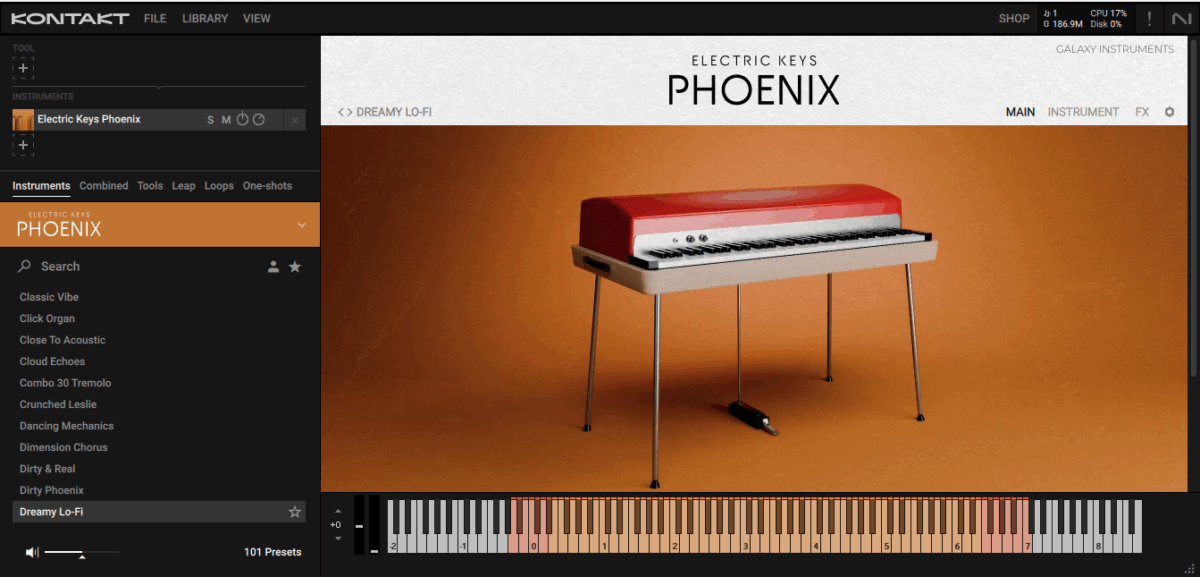
Let’s add the chords in with Electric Keys: Phoenix on the Dreamy Lo-Fi preset.
Native Instruments · lo-fi keys
With that foundation down, we can layer a dreamy melody on top with Lo-Fi Glow. The Gloxtone preset can give us just that. Let’s make something simple, sparse, and nostalgic:
Native Instruments · lo-fi melody
Finally, we’ll tie this all together with a relaxed, hazy drum beat. We’ll give it a retro sheen with the Time Machine preset on Bite:
Native Instruments · lo-fi drums
The instruments we’ve used here have resulted in a warm and relaxed lo-fi sketch:
Native Instruments · lo-fi sketch
Dance music is a broad genre of music, often characterized by a strong, repetitive beat and a high-energy feel.
It’s only natural that the synthesizer, being an electronic instrument, is front and center in electronic music. Synths like Massive X are perfect for writing powerful basslines and leads that drive a track.
Set the tempo to 125 BPM for a house track.
Before we get to the synths, we’ll lay down our house beat with Battery 4. We’ll use a 909 kit, which is a house music staple, and write in a simple, but classic, house beat.

Our house beat on a piano roll.
Native Instruments · house beat
Let’s add our first instance of Massive X for a weighty bassline. We’ll filter by ‘Bass’ within the Our House expansion. Evil House is perfect for a bouncy, round low end.
Native Instruments · house bass
After that, we’ll layer on a house organ for our lead. We’ll use the Definitely preset, also from Our House.
Native Instruments · house organ
To make all of these tracks sit together in the mix in a satisfying way, we’ll add in some Bite and Raum to our lead, Supercharger GT to the drums, and Replika XT to the high-end frequencies of the bass. Together they sound like this:
Native Instruments · house sketch
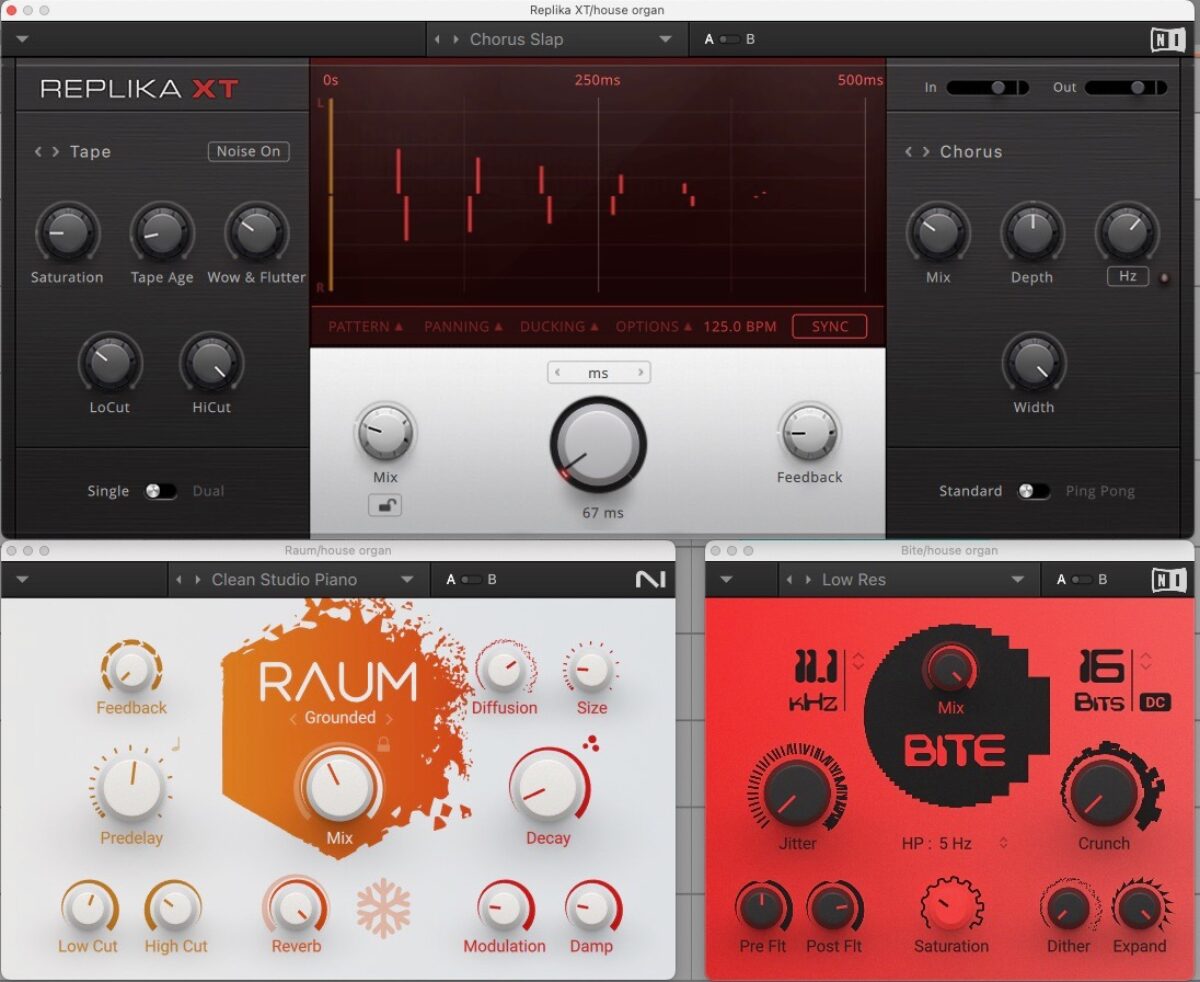
These effects are included in all tiers of the NI 360 subscription.
Cinematic music focuses on emotion, as it’s often composed to enhance and underscore what’s happening on screen.
Writing cinematic music requires a sense of scale and an evocative atmosphere. Two instruments that are perfect for this are Pharlight and Noire.
We’ll start by setting the tempo to 70 BPM in a 5/4 time signature.
Next, we’ll add a pad from Pharlight. We’re using the Desolate Angels preset for our slow-moving low end. Hold a simple chord, and you’ll already feel a dramatic swell.

You can copy in these MIDI notes or create your own drone pattern.
Native Instruments · cinematic drone
For a mysterious-sounding melody, we’ll add in Noire Felt playing an arpeggiated lead line that emphasizes a minor 9 chord.
Native Instruments · cinematic piano
To finish it off, we’ll punctuate the first count of each bar with a sub-heavy kick and one more instance of Pharlight.
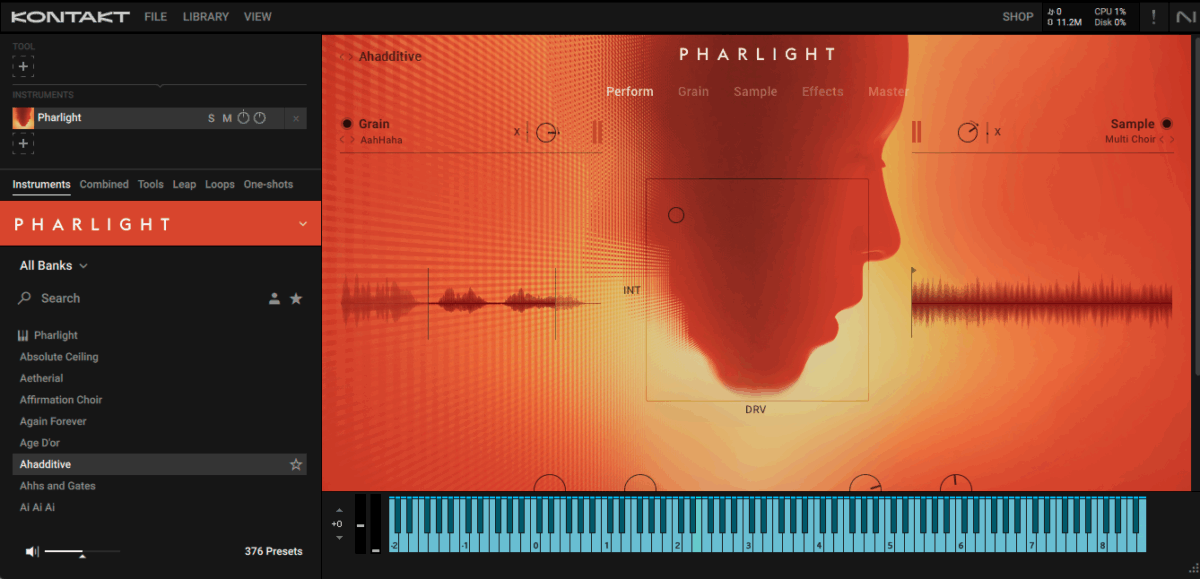
Adding a root note on the Ahadditive preset highlights the start of each bar.
We’re left with a cinematic soundscape that feels ready for film or game scoring:
Native Instruments · cinematic sketch
As producers, we often fall into habits. We reach for the instruments we know and build similar beats. But genre exploration pushes us outside our comfort zones, and can give us new ideas and techniques.
The NI 360 subscription was created to make that exploration possible. With instruments covering just about every genre imaginable, you have the freedom to experiment without barriers. One day you might be making ambient soundscapes, the next you’re writing bangers. All with one subscription. Why don’t you try making some new sounds today?
Make music for free
The post Understanding genre through instruments: a producer’s guide first appeared on Native Instruments Blog.
That means that trying out new sounds can be one of the fastest ways to step into a new genre. With the NI 360 subscription, you get access to a range of creative tools that make it easy to write across countless styles. In this article, we’ll explore exactly how to do that through three genres: lo-fi hip hop, dance music, and cinematic soundscaping. Just keep in mind that what you learn here can be applied to any genre.
Jump to these sections:
Follow along with this tutorial using an NI 360 subscription.
Make music for free
What is the NI 360 subscription?
The NI 360 subscription is Native Instruments’ all-in-one music production membership. It gives you access to a curated library of synths, sampled instruments, and effects. It’s the perfect choice for a multifaceted producer who is looking into genre exploration. It also works in any DAW.
In other words, it gives you a flexible way to access an entire ecosystem of production tools.
The NI 360 subscription comes in different tiers, and each offers its own set of instruments and plugins. The exact lineup depends on which tier you choose, but regardless of your selection, every plan gives you a wide collection of synths, sampled instruments, and creative effects to work with.
Here are just a few highlights, and some genres we think you could make with them:
- Lo-Fi Glow and Electric Keys: Tines Duo for lo-fi hip hop
- Massive X and Battery 4 for electronic and dance music
- Pharlight and Noire for scoring and cinematic textures
- Raum and Replika XT for spatial design across genres
- Kontakt 8 to host a huge variety of sample libraries and creative tools
And that’s really just scratching the surface. The diversity is what makes this such an exciting subscription. You can use any of these tools to move between genres with ease.
How can the NI 360 subscription help me explore new sounds and genres?
A subscription like 360 gives you creative freedom. It would work perfectly if you were, for instance, a hip hop producer looking to dip your toes into cinematic scoring. Committing to buying a cinematic sample library might just be too much for you, and that could end up restricting you to what you already know.
But because the subscription covers multiple genres in depth, it lowers the barrier to experimentation. You can test-drive entirely new sounds and learn what inspires you most, all in one toolkit that’s continually updated with new instruments, sounds, and effects.
Exploring different genres in your music
Now let’s put these instruments into practice by making three short sketches in three different genres: lo-fi hip hop, dance, and cinematic. We’ll be using creative tools and instruments included in 360 Essentials and Plus.
1. Lo-fi hip hop with smooth keys and Lo-Fi Glow
Lo-fi music is short for “low-fidelity,” and is a genre of music characterized by intentional production imperfections, such as background noise, tape hiss, and distorted sound, which create a raw, nostalgic, and relaxed aesthetic.
Let’s get some lo-fi hip hop instrumentation in our track. Think dusty chords, muffled drums, and warm, nostalgic melodies.
Lo-fi typically sits between 60–90 BPM. For this sketch, let’s set our tempo to 81 BPM.
The first thing we’ll do is lay down some chords. Lo-fi often uses jazzy progressions. A simple ii-V-I works well.
Let’s add the chords in with Electric Keys: Phoenix on the Dreamy Lo-Fi preset.
Native Instruments · lo-fi keys
With that foundation down, we can layer a dreamy melody on top with Lo-Fi Glow. The Gloxtone preset can give us just that. Let’s make something simple, sparse, and nostalgic:
Native Instruments · lo-fi melody
Finally, we’ll tie this all together with a relaxed, hazy drum beat. We’ll give it a retro sheen with the Time Machine preset on Bite:
Native Instruments · lo-fi drums
The instruments we’ve used here have resulted in a warm and relaxed lo-fi sketch:
Native Instruments · lo-fi sketch
2. Electronic grooves with Massive X and Battery 4
Dance music is a broad genre of music, often characterized by a strong, repetitive beat and a high-energy feel.
It’s only natural that the synthesizer, being an electronic instrument, is front and center in electronic music. Synths like Massive X are perfect for writing powerful basslines and leads that drive a track.
Set the tempo to 125 BPM for a house track.
Before we get to the synths, we’ll lay down our house beat with Battery 4. We’ll use a 909 kit, which is a house music staple, and write in a simple, but classic, house beat.
Our house beat on a piano roll.
Native Instruments · house beat
Let’s add our first instance of Massive X for a weighty bassline. We’ll filter by ‘Bass’ within the Our House expansion. Evil House is perfect for a bouncy, round low end.
Native Instruments · house bass
After that, we’ll layer on a house organ for our lead. We’ll use the Definitely preset, also from Our House.
Native Instruments · house organ
To make all of these tracks sit together in the mix in a satisfying way, we’ll add in some Bite and Raum to our lead, Supercharger GT to the drums, and Replika XT to the high-end frequencies of the bass. Together they sound like this:
Native Instruments · house sketch
These effects are included in all tiers of the NI 360 subscription.
3. Cinematic textures with Pharlight and Noire
Cinematic music focuses on emotion, as it’s often composed to enhance and underscore what’s happening on screen.
Writing cinematic music requires a sense of scale and an evocative atmosphere. Two instruments that are perfect for this are Pharlight and Noire.
We’ll start by setting the tempo to 70 BPM in a 5/4 time signature.
Next, we’ll add a pad from Pharlight. We’re using the Desolate Angels preset for our slow-moving low end. Hold a simple chord, and you’ll already feel a dramatic swell.
You can copy in these MIDI notes or create your own drone pattern.
Native Instruments · cinematic drone
For a mysterious-sounding melody, we’ll add in Noire Felt playing an arpeggiated lead line that emphasizes a minor 9 chord.
Native Instruments · cinematic piano
To finish it off, we’ll punctuate the first count of each bar with a sub-heavy kick and one more instance of Pharlight.
Adding a root note on the Ahadditive preset highlights the start of each bar.
We’re left with a cinematic soundscape that feels ready for film or game scoring:
Native Instruments · cinematic sketch
Explore new sounds in your music
As producers, we often fall into habits. We reach for the instruments we know and build similar beats. But genre exploration pushes us outside our comfort zones, and can give us new ideas and techniques.
The NI 360 subscription was created to make that exploration possible. With instruments covering just about every genre imaginable, you have the freedom to experiment without barriers. One day you might be making ambient soundscapes, the next you’re writing bangers. All with one subscription. Why don’t you try making some new sounds today?
Make music for free
The post Understanding genre through instruments: a producer’s guide first appeared on Native Instruments Blog.